Fix the Photoshop CS4 layer-dragging crash bug in Mac OS 10.8 Mountain Lion
This has been plaguing me for a while since I updated to Mac OS 10.8. Dragging layers in the layers palette of Photoshop CS4 would cause an immediate crash to desktop. Finally found a solution in this thread which worked.
Solution: turn off the OS power-saving graphics switching.
It’s the checkbox at the top of the Energy Saving preference pane:
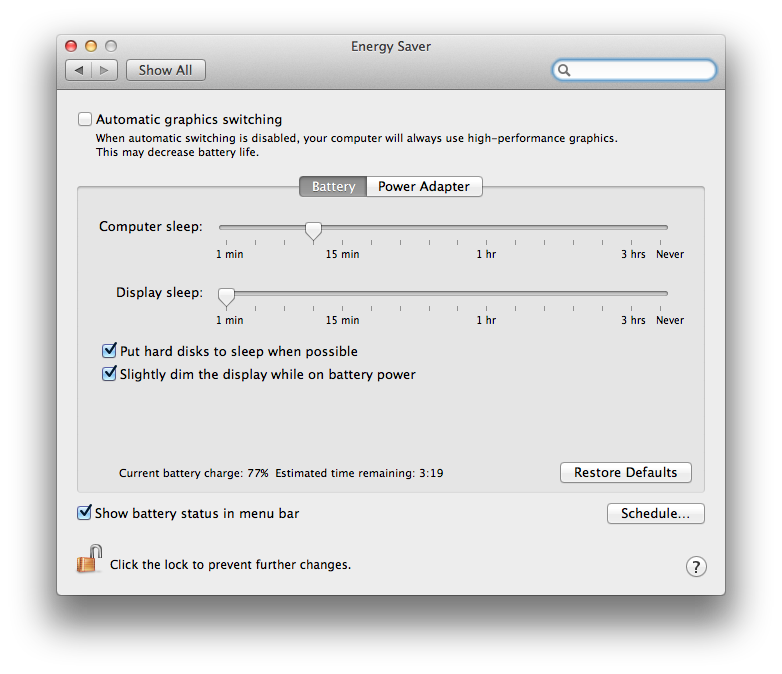
You’ll need to ensure that it’s unchecked and probably restart after that.
Now I can drag layers all day long.
Comments
Sebtantesept
Posted at .
Thank you so much!
At last a short, clear and efficient answer!
Cai Wingfield
Posted at .
Glad it helped you out!
He Shiming
Posted at .
Huh, some smart trick, and elegant. Thanks!
Cai Wingfield
Posted at .
No probs, glad it helped you out.
evan
Posted at .
this little trick worked for me. wish i seen it before deleting and reinstalling everything to no avail. thanks for posting it.
Cai Wingfield
Posted at .
No problem at all.
francien verhulst
Posted at .
thanks for posting; you saved me :-)
Cai Wingfield
Posted at .
Excellent :)
rachel
Posted at .
Finally, relief after SO MANY HOURS of tearing out my hair - thank you for posting this!!!
Cai Wingfield
Posted at .
You’re very welcome, glad it helped you out.
markw
Posted at .
I need to search this topic once a year when I upgrade my OS. Yours came up first this time. Thanks! I believe there’s a second symptom and fix for this problem. A dynamically switching video card may also make PS unstable. I have to remember to set my card to Discrete Only with the gfxCardStatus app as well. Maybe there’s a more permanent workaround that I’m not aware of.
Cai Wingfield
Posted at .
Glad it helped you out. I’m going to check out that app you mentioned, too.
ivy
Posted at .
Thank you for this post! It works!!!!
Cai Wingfield
Posted at .
Great, I’m glad to hear it!
Mel
Posted at .
OMG THANK YOU!! I assumed this couldn’t be fixed, then finally TODAY I thought I’d google to see if there were solutions! I can’t believe it was this simple! Problem solved!! THANK YOU!
And thank you for titling this perfectly so it was easy to find in a google search!
Cai Wingfield
Posted at .
*salutes*
Mel
Posted at .
*salutes back!*
I’ve been dragging layers and folders around all day :)
Thank you again!
Taren
Posted at .
Quick, efficient fix - thank you!!!
Cai Wingfield
Posted at .
You’re welcome, glad I could help!
Mel
Posted at .
Had this problem again, and I knew there was a solution I’d found online before, but couldn’t remember what it was. Googled and found your post. Looks like this is where I found the solution a few years ago too, because I see my previous comments to you! Thank you again!
Cai Wingfield
Posted at .
Haha, glad to be of service! :)
To add your own comment, or reply to an existing one, email me and be clear what your comment is, what name you'd like it posted under, and if you'd like a link included (like a homepage). I may edit comments for length or clarity. If you'd like to delete an old comment or change your name, let me know.